Declaring your cryptocurrency operations for personal income tax (IRPF) might seem complex, but at Bit2Me, we aim to simplify it. Below, we'll guide you step-by-step using the information from your TAX report, which you can easily get from your user account: How to get your tax information on Bit2Me? (for Spanish residents only).
Important: Bit2Me provides information for your personal income tax (IRPF) return, but is not responsible for your declaration. Please review the data and steps in your report and consult a tax advisor if you deem it necessary. |
Below, we provide a breakdown of the TAX report, explaining each of the different points to follow and data to declare in your tax return.
On the first page of the report, you will find the summary of gains and losses with the values to declare, following the steps and breakdown shown on the subsequent pages of the report:
1. Capital gains and losses from asset transfers in Euros.
Gains or losses derived from buy, sell, or exchange operations of crypto assets.
- These losses or gains from your buy, sell, or exchange transactions are recorded in box 1804 of the tax return:

By entering one by one the transfer values in Euros and the acquisition values in Euros per transacted asset that appear in the "Summary of gains and losses by asset for 2024" table in your TAX report: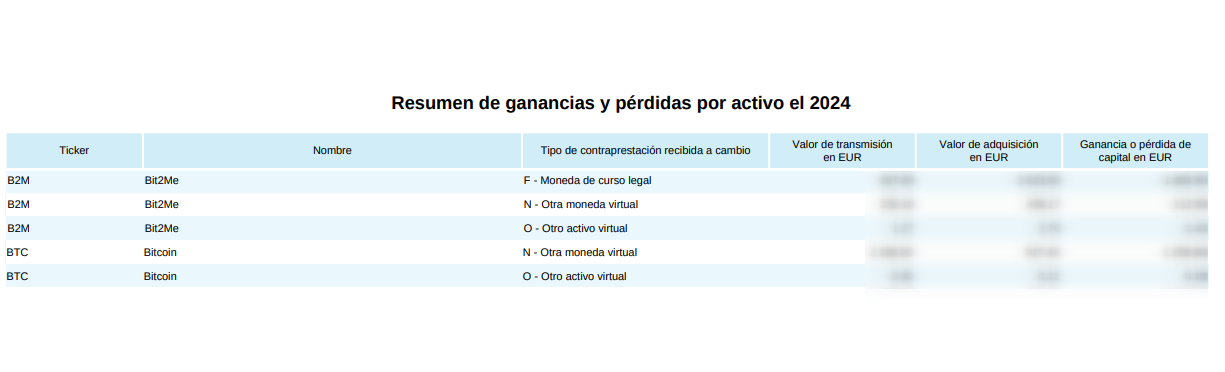
- To register the movements, click on the edit icon (pencil) next to box 1804 and complete the following form:
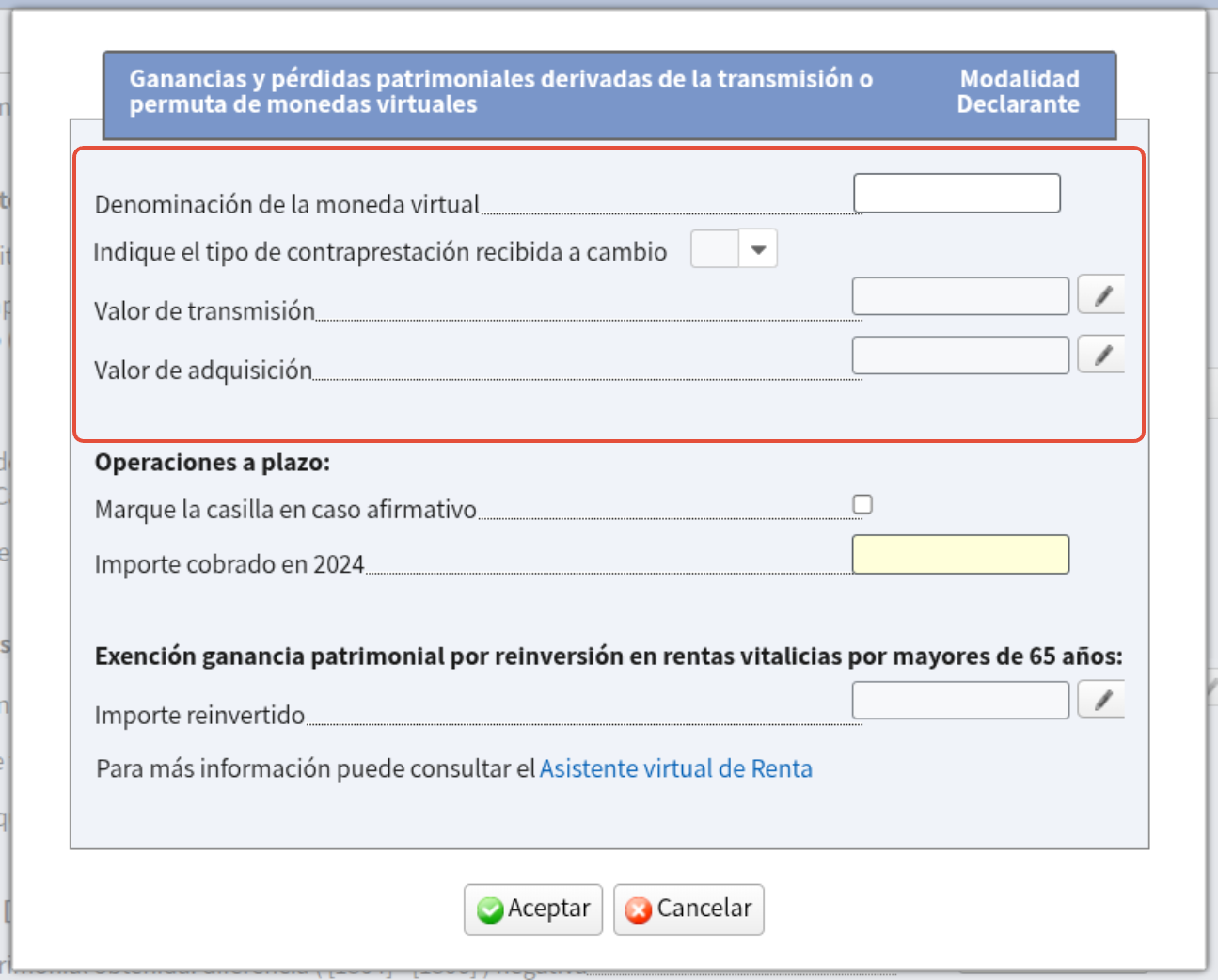
- Virtual currency denomination: Indicate the name shown in the "Name" column of the "Summary of gains and losses by asset" table in your Tax report.
- Type of consideration received in exchange: Select the one indicated in the table from the dropdown menu.
- Transfer value:
- Transfer amount: Copy the amount indicated in the Tax report table.
- Transfer expenses: Nothing needs to be entered. Transfer expenses are already deducted from the transfer amount indicated in the report.
- Acquisition value:
- Acquisition amount: Copy the amount indicated in the Tax report table.
- Acquisition expenses: Nothing needs to be entered. Acquisition expenses are already deducted from the acquisition amount indicated in the report.
- The following fields would not be necessary to fill in beforehand. Consult your manager or tax advisor if you have any doubts.
Once the fields indicated in the previous points are completed, click ACCEPT. Upon accepting, you will see how the rest of the boxes (1806, 1807, 1808) auto-populate.
You must do the same for all lines in the "Summary of gains and losses by asset" table in the Tax report. To add another record in the tax declaration tool, click on the "Add Asset Element" button that you will see at the beginning of your draft form:

2. Returns on movable capital in EUR.
The total return value indicated in the TAX report corresponds to the value obtained in cryptocurrencies from staking in Earn.
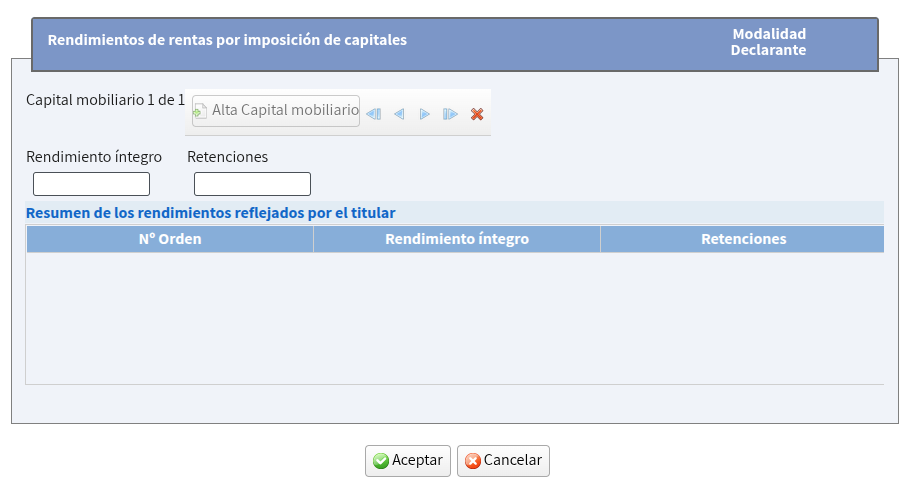
You must indicate this Euro value in the box 0033:

Enter the amount indicated in the report without adding withholdings in the box that will appear when you click on the edit icon (pencil) for gross return. The amount reflected in your tax report summary already has them deducted.
 3. Capital gains and losses not derived from asset transfers in Euros.
The total capital gains and losses value reflected in this section is obtained from airdrops and cashback generated from the Bit2Me Card, funds that do not come directly from a sale or exchange.
You must indicate this Euro value in the box 0304:

4. Total transaction values not deducted in Euros
The value that appears in the Tax report in this section is for informational purposes but should not be added to any section of your tax return, as the amounts of gains and losses recorded in the previous sections already have these commission expenses deducted.
Was this article helpful?
That’s Great!
Thank you for your feedback
Sorry! We couldn't be helpful
Thank you for your feedback
Feedback sent
We appreciate your effort and will try to fix the article